Node Lifecycle & Monitoring
Once your Execution Agent is running, it operates completely autonomously. However, you should monitor your Provider Dashboard to ensure your hardware is performing optimally and to track your active nodes.
Understanding Your Dashboard Metrics
The Provider Dashboard gives you a real-time overview of your fleet. Pay attention to the four primary metrics at the top of your screen:
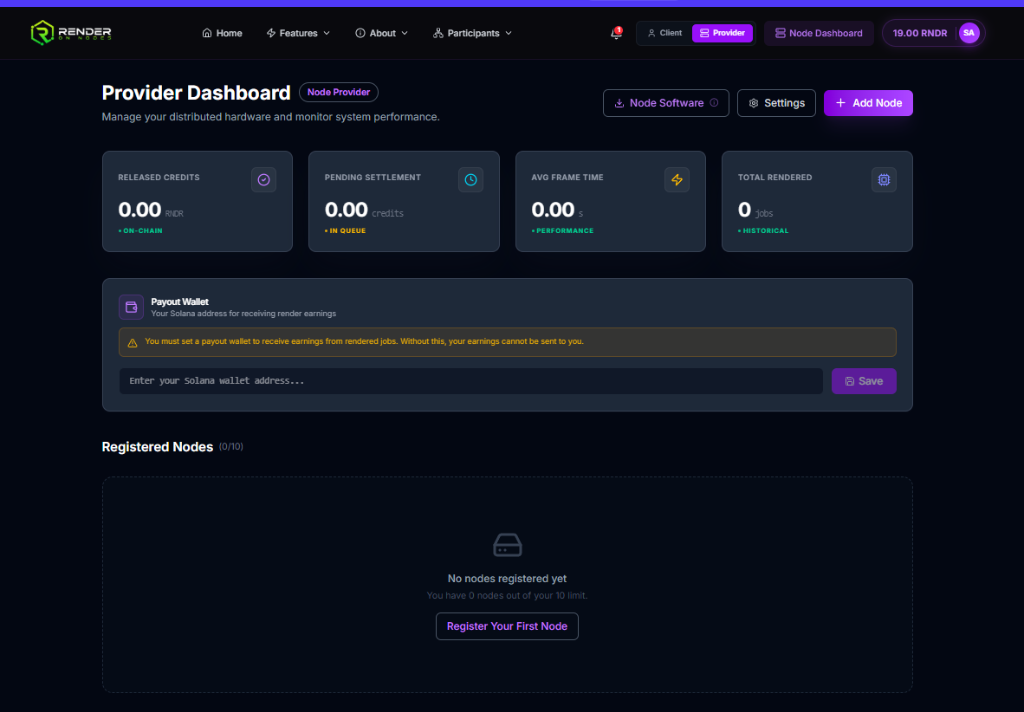
- Released Credits: The total amount of RON that has been successfully transferred to your Solana wallet on-chain.
- Pending Settlement: The amount of RON you have earned from completed jobs currently waiting for the next automatic settlement.
- Avg Frame Time: A performance indicator showing how quickly your hardware processed historical frames. A lower number means the network favors you for new jobs.
- Total Rendered: The total volume of jobs your nodes have successfully processed.
Node Status Indicators
In the Registered Nodes section, you can monitor the real-time status of each machine connected to your account. Your nodes will cycle through the following operational states:
🟢 Active (Idle)
The node is online, connected to the network, and actively listening for a job assignment. It is currently maintaining a heartbeat with the orchestration layer.
🔵 Computing
The node has successfully negotiated a job, downloaded the required assets, and the GPU is currently executing the render payload. During this phase, you will see GPU utilization spike on your local machine.
🟡 Verifying
The node has completed the render and uploaded the final artifacts to the secure staging layer. The network is currently running cryptographic checks to ensure the result is mathematically accurate and hasn't been tampered with.
🔴 Offline
The node has failed to send a heartbeat to the network for a prolonged period. This typically occurs if your local Execution Agent is closed, your machine goes to sleep, or you lose internet connectivity.
Troubleshooting an Offline Node
If your node goes offline unexpectedly:
- Ensure your computer has not entered Sleep or Hibernation mode. We recommend setting your power plan to "High Performance" and disabling sleep entirely.
- Verify that the RenderOnNodes Execution Agent is actively running in your system tray.
- Check your local internet connection. The node requires a persistent out-bound connection to receive jobs.